
 Deals Of The Day
 Top Sellers
 Top Trending
 New Arrivals
 Shop By Brands
Cabinets Computer
Shop industrial computer cabinets and computer enclosure cabinets at Janeice Products Co Inc, your trusted material handling supply source based in Aiken, South Carolina. Whether you need protective enclosures for industrial computers, low-profile computer carts for workstation applications, or secure cellphone and tablet lockers for employee devices, our catalog offers practical solutions for organizing and protecting essential technology in demanding work environments. Designed for manufacturing facilities, warehouses, production floors, offices, and industrial workstations, our computer cabinet solutions help businesses keep equipment organized, accessible, and better protected from everyday workplace conditions.
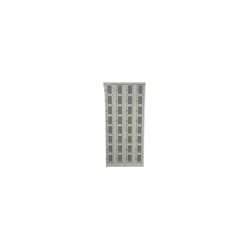
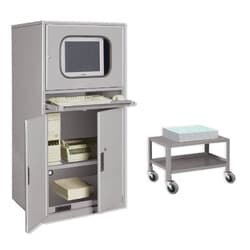
How to Choose the Right Computer Cabinet
Choosing the right computer cabinet for your facility starts with understanding the equipment you need to protect and the environment in which it will be used. Consider the dimensions of your computer, monitor, keyboard, and other accessories, along with ventilation requirements, cable routing, accessibility, and available installation space. A properly selected computer cabinet helps keep equipment organized while supporting efficient daily operations.
For manufacturing plants, warehouses, and production areas, computer enclosure cabinets can help protect workstation equipment from routine workplace exposure and accidental contact. When selecting an enclosure, consider the cabinet's construction, door configuration, access points, and compatibility with your computer hardware. Ensure that the design provides sufficient airflow for the equipment installed inside.
If your employees need access to computers at different workstations, low-profile computer carts may provide a more flexible solution than fixed cabinets. For facilities that need to manage personal electronic devices, cellphone and tablet lockers offer a separate storage option for keeping devices organized during working hours.
Before purchasing, measure the equipment and installation area carefully. Check the cabinet's internal dimensions, mounting requirements, ventilation provisions, cable access, and any environmental protection ratings specified by the manufacturer. Selecting the right configuration can help extend equipment service life and maintain a more organized workplace.
Key Features to Look for in Industrial Computer Cabinets
-
Equipment Compatibility: Verify that the cabinet accommodates your computer, monitor, keyboard, and accessories, including any required mounting hardware.
-
Protective Construction: Choose a cabinet designed for the conditions of your workplace, considering dust exposure, accidental contact, and other environmental factors.
-
Ventilation: Check for appropriate airflow provisions to help prevent overheating during continuous computer operation.
-
Cable Management: Look for suitable cable entry points and routing options to keep power and data connections organized.
-
Accessibility: Consider door access, removable or adjustable components, and the ease of reaching controls and connections during maintenance.
-
Space Efficiency: Low-profile computer carts and appropriately sized enclosures can help maximize usable space in busy production areas and workstations.
-
Device Storage: If your facility needs secure storage for employee electronics, consider cellphone and tablet lockers suited to your device-storage requirements.
-
Installation Requirements: Check dimensions, mounting arrangements, electrical access, and manufacturer specifications before selecting a cabinet.
Industries That Use Computer Cabinets
-
Manufacturing: Protect computer workstations used for production monitoring, process control, and operational reporting.
-
Warehousing & Distribution: Support warehouse management systems, inventory tracking, barcode scanning stations, and shipping operations.
-
Industrial Facilities: Organize computers used for equipment monitoring, maintenance records, and production management.
-
Logistics & 3PL: Support workstation equipment used for order processing, shipment tracking, and inventory coordination.
-
Education & Training: Organize computer equipment and provide designated device-storage areas in training rooms and laboratories.
-
Corporate Offices: Maintain organized computer workstations and manage shared electronic devices where appropriate.
-
Maintenance & Repair: Provide structured workstation arrangements for technical documentation, equipment diagnostics, and service operations.
Frequently Asked Questions About Computer Cabinets
Q1: What are industrial computer cabinets used for?
Industrial computer cabinets are used to house, organize, or protect computer equipment in manufacturing facilities, warehouses, workshops, and other business environments. Depending on the model, they may accommodate computers, monitors, keyboards, and related accessories.
Q2: What is the difference between a computer enclosure cabinet and a computer cart?
A computer enclosure cabinet is generally intended to house equipment in a defined enclosure, while a computer cart provides a workstation that can be moved or positioned as needed, depending on its design. The best choice depends on whether your application requires a fixed installation, equipment protection, or greater workstation flexibility.
Q3: How do I choose the correct size computer cabinet?
Measure the computer, monitor, and accessories you intend to install. Check the cabinet's internal dimensions, mounting clearances, cable-routing space, and ventilation requirements. Allow sufficient room for connections and maintenance access, and confirm compatibility with the manufacturer's specifications before ordering.
Q4: Do computer cabinets need ventilation?
Yes. Computers and other electronic equipment generate heat during operation. Appropriate ventilation or cooling provisions help maintain suitable operating temperatures. Review the equipment manufacturer's requirements and the cabinet specifications to determine whether additional cooling is necessary.
Q5: Can computer cabinets be used in industrial environments?
Yes. Computer enclosure cabinets can be suitable for industrial workstations when their construction and protection features match the workplace conditions. Before purchasing, evaluate dust, moisture, temperature, and other environmental factors, and verify any applicable protection ratings rather than assuming every cabinet is suitable for all industrial conditions.
Q6: Are cellphone and tablet lockers available for workplace device storage?
Janeice Products lists cellphone and tablet lockers in its Cabinets Computer category. These products provide a dedicated storage option for employee electronic devices. Check the individual product specifications for locker configuration, capacity, locking arrangements, and supported device sizes.
Q7: What should I consider before ordering a computer enclosure cabinet?
Before ordering, confirm the equipment dimensions, cabinet construction, ventilation requirements, cable access, installation method, accessibility, and environmental conditions. For mobile workstation applications, also consider cart dimensions, mobility, and stability. Reviewing these requirements helps ensure that the selected cabinet meets your facility's operational needs.